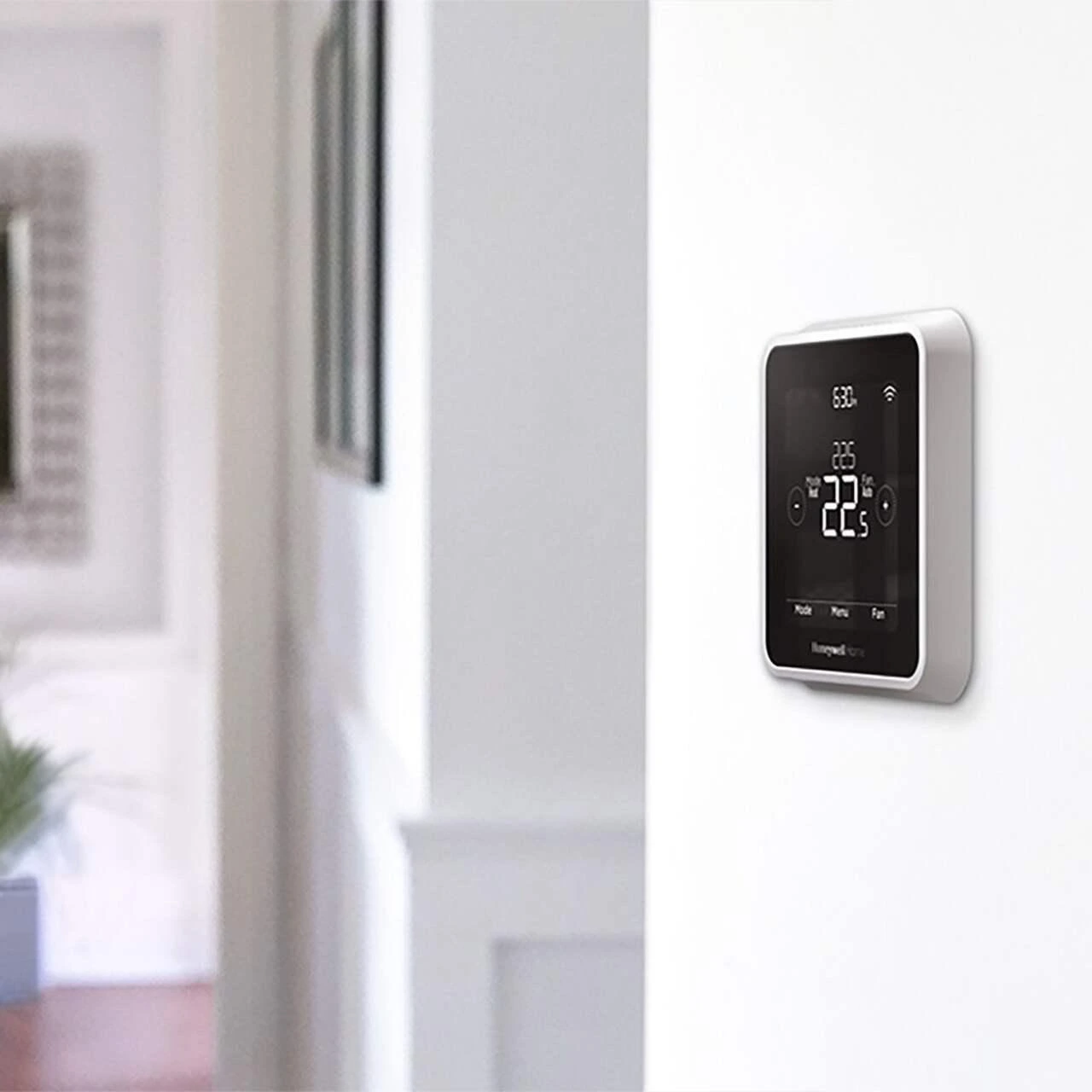
Honeywell Smart Thermostat Battery Guide: 12 Essential Facts Every Homeowner Should Know
Honeywell Smart Thermostat Battery
Not all Honeywell smart thermostats use batteries. Wi-Fi models like the T9 and T10 Pro are usually hardwired through a C-wire, while many FocusPRO and older programmable models run on AA or AAA batteries — either as their main power source or as backup power during outages. Check your model number to know which type you have.
Smart thermostats have transformed the way homeowners manage indoor comfort. Instead of manually adjusting the temperature throughout the day, today’s devices automatically learn schedules, respond to mobile apps, and help reduce energy consumption. Among the most trusted names in home climate control, Honeywell Home offers a wide range of thermostats designed for different heating and cooling systems.
One question that frequently appears online is whether a Honeywell smart thermostat battery needs to be replaced. The answer isn’t as straightforward as many people expect because Honeywell manufactures several thermostat families. Some models rely entirely on household power supplied through a C-wire, while others include replaceable batteries that either power the device or provide backup power during outages. Understanding which category your thermostat belongs to is the first step toward proper maintenance.
This guide explains everything homeowners need to know, including how to identify battery-powered models, recognize low-battery warnings, choose the correct battery type, and maintain reliable thermostat performance throughout the year.
Why Understanding Your Thermostat’s Power Source Is Important
Many homeowners assume every thermostat works the same way. In reality, Honeywell has developed dozens of models over the years, each designed for different HVAC systems and installation methods. Some are powered directly by your home’s heating and cooling equipment, while others depend partly or entirely on replaceable batteries.
Knowing how your thermostat receives power helps you avoid unexpected heating or cooling interruptions. If a battery-powered thermostat suddenly loses power, scheduled temperature settings may stop working, and the display could become blank or unresponsive. Replacing batteries before they become fully depleted can prevent these inconveniences.
Honeywell Smart Thermostat Battery maintenance also protects your thermostat’s internal electronics. Old batteries left inside the compartment for extended periods may leak, potentially damaging sensitive components. Regular inspection ensures dependable performance throughout every season.
Another reason this topic matters is energy efficiency. A properly functioning thermostat communicates effectively with your HVAC system, helping maintain consistent indoor temperatures while avoiding unnecessary energy use. Small maintenance tasks, such as timely battery replacement, contribute to reliable system performance.
Do All Honeywell Smart Thermostats Use Batteries?
One of the biggest misconceptions is that every Honeywell smart thermostat contains replaceable batteries. This isn’t true.
Many newer smart models, including several Wi-Fi-enabled thermostats, receive continuous power through a C-wire (common wire) connected to the home’s HVAC system. These models typically don’t require regular battery replacement because household electrical power operates the thermostat.
Other Honeywell thermostats include batteries for one of two purposes:
- Primary Power: The thermostat operates directly from replaceable batteries.
- Backup Power: Batteries preserve settings and maintain operation during temporary power interruptions.
Because Honeywell has released numerous thermostat series over the years, always verify your specific model before purchasing replacement batteries.
Understanding the Different Thermostat Categories
Smart Thermostats
Smart models connect to Wi-Fi and allow homeowners to adjust temperatures remotely using a smartphone app. Many also support voice assistants such as Amazon Alexa or Google Assistant.
Examples include:
- Honeywell Home T5
- Honeywell Home T9
- Honeywell Home T10 Pro
- Honeywell Home X2S
Most of these rely primarily on hardwired electrical power rather than removable batteries.
Programmable Thermostats
Programmable thermostats let users create daily or weekly schedules. Some older models use AA or AAA batteries, while others are hardwired.
Non-Programmable Models
These simpler thermostats generally offer manual temperature adjustment. Depending on the specific model, they may operate using replaceable batteries or HVAC power.
Understanding which category your thermostat belongs to makes maintenance much easier.
Which Honeywell Models Need Replaceable Batteries?

Although many recent smart thermostats are hardwired, several Honeywell thermostat families still use batteries.
| Thermostat Family | Replaceable Battery | Notes |
|---|---|---|
| FocusPRO Series | Yes | Usually AA batteries |
| Some Programmable Models | Yes | Battery-powered or backup |
| T9 Smart Thermostat | Usually No | Powered through C-wire |
| T10 Pro | Usually No | Hardwired installation |
| VisionPRO Models | Varies | Check model documentation |
Because configurations differ, the safest approach is to inspect your thermostat or review the owner’s manual before purchasing batteries.
Common Battery Types
Honeywell thermostats typically use one of the following:
- AA alkaline batteries
- AAA alkaline batteries
- Occasionally lithium batteries (specific models)
Alkaline batteries from reputable manufacturers generally provide reliable performance and longer service life.
Avoid mixing old and new batteries or combining different brands in the same thermostat. Doing so can reduce performance and increase the risk of leakage.
Rechargeable batteries may function in some models but often produce slightly lower voltage than disposable alkaline batteries. Unless the user manual specifically approves rechargeable batteries, standard alkaline options remain the safest choice.
How to Find Your Thermostat Model Number
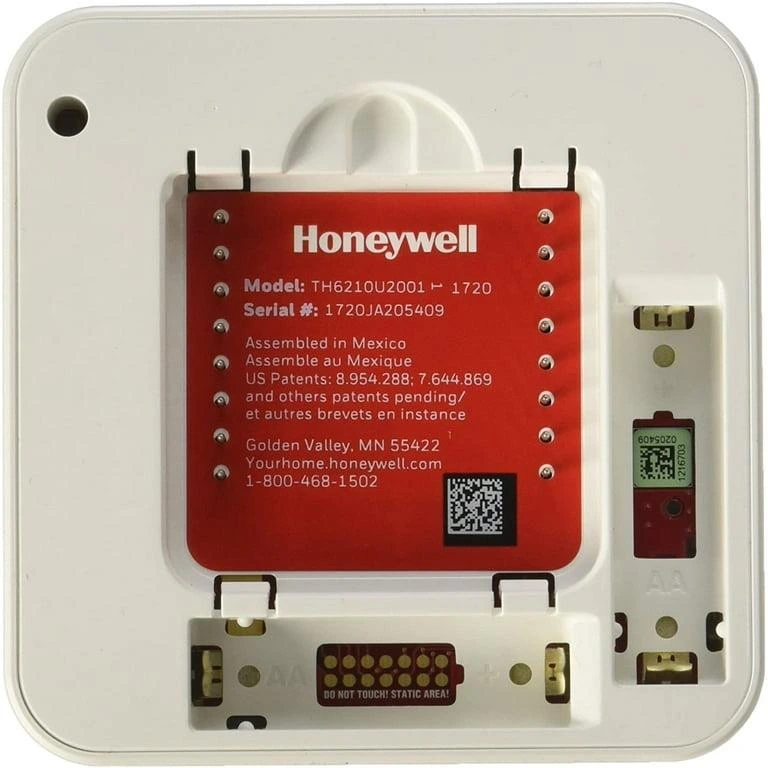
Before replacing batteries or troubleshooting problems, identify your exact thermostat model.
You can usually locate the model number by:
- Looking on the front bezel.
- Removing the thermostat faceplate.
- Checking the back of the unit.
- Reviewing the original installation manual.
- Using the Honeywell Home mobile app (for compatible smart models).
Knowing the exact model prevents purchasing incorrect batteries or following instructions meant for a different thermostat.
Signs Your Honeywell Smart Thermostat Battery Needs Attention
Most Honeywell thermostats provide clear warnings before batteries become completely depleted.
Common indicators include:
- Low battery icon on the display.
- Flashing battery symbol.
- Blank or dim screen.
- Delayed system response.
- Settings resetting unexpectedly.
- Wi-Fi connection dropping on supported models.
Ignoring these warning signs can eventually cause the thermostat to stop functioning until fresh batteries are installed.
Replacing batteries promptly helps ensure uninterrupted heating and cooling control.
How to Replace the Battery Safely
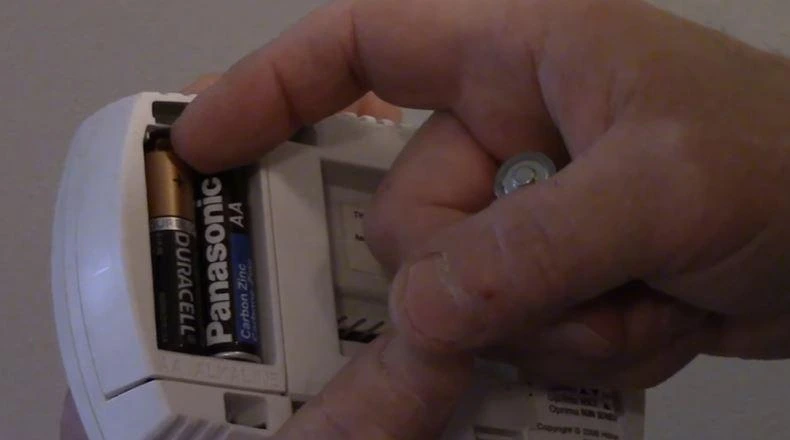
Replacing the batteries in a Honeywell thermostat is usually a quick process that takes only a few minutes. Although the exact steps vary slightly by model, the general procedure remains similar across most battery-powered units.
Before starting, make sure you have the correct replacement batteries recommended for your thermostat. Using the wrong size or mixing old and new batteries can reduce performance and may even damage the device over time.
Follow these steps:
- Check the model number to confirm the required battery type.
- Remove the thermostat faceplate by gently pulling it away from the wall plate. Most models snap off without needing tools.
- Locate the battery compartment. Depending on the model, it may be behind the display or inside a slide-out tray.
- Remove the old batteries and inspect the compartment for dust or corrosion.
- Insert the new batteries while matching the positive (+) and negative (-) markings.
- Reattach the faceplate securely.
- Wait a few seconds for the display to restart and verify that all settings appear correctly.
If your thermostat is hardwired with a C-wire, batteries—if present—may serve only as backup power. In those cases, replacing them is still worthwhile because they help preserve settings during a power outage.
What to Do If the Thermostat Still Doesn’t Work
Installing fresh batteries doesn’t always solve the problem. If the screen stays blank or the HVAC system doesn’t respond, another issue may be responsible.
Here are some common causes:
Batteries Installed Incorrectly
Double-check that each battery is facing the correct direction. Even one reversed battery can prevent the thermostat from powering on.
Dirty Battery Contacts
Dust or light corrosion may interrupt the electrical connection. Carefully clean the contacts with a dry cotton swab before inserting fresh batteries.
Loose Faceplate
Some Honeywell thermostats require the faceplate to click firmly into place. If it isn’t fully seated, the display may remain off.
C-Wire or HVAC Power Issue
If your thermostat relies on household power, the problem may not be battery-related at all. Check the HVAC circuit breaker and verify that the furnace or air handler is supplying power.
Internal Fault
Although uncommon, internal electronic components can fail after years of use. If basic troubleshooting doesn’t restore operation, contacting a qualified HVAC technician may be the best option.
How Long Do Thermostat Batteries Last?
Battery life depends on several factors, including the thermostat model, battery quality, indoor temperature, and how frequently the display is used.
Under normal household conditions:
| Battery Type | Typical Lifespan |
|---|---|
| AA Alkaline | 12–18 months |
| AAA Alkaline | 10–18 months |
| Lithium | Up to 2 years (model-dependent) |
Premium alkaline batteries often last longer than budget brands because they provide more consistent voltage over time.
Rather than waiting for a warning message, many homeowners replace thermostat batteries once a year. Performing this simple maintenance before the heating or cooling season begins helps prevent unexpected interruptions.
Tips to Extend Battery Life

A few simple habits can help your thermostat operate more efficiently while extending battery life.
- Replace all batteries at the same time.
- Use fresh, high-quality alkaline batteries from trusted brands.
- Avoid mixing different battery brands.
- Remove depleted batteries promptly to reduce the risk of leakage.
- Keep the thermostat clean and free of dust.
- Maintain your HVAC system regularly so the thermostat doesn’t work harder than necessary.
- Store spare batteries in a cool, dry place.
These practices improve reliability and help reduce maintenance costs over time.
Common Honeywell Smart Thermostat Battery Mistakes to Avoid
Even experienced homeowners occasionally make small mistakes when replacing thermostat batteries.
Some of the most common include:
- Installing batteries backwards.
- Mixing old and new batteries.
- Combining different battery brands.
- Using rechargeable batteries when the manufacturer recommends alkaline cells.
- Ignoring low-battery warnings for several weeks.
- Forgetting to reinstall the thermostat faceplate securely.
Avoiding these mistakes helps ensure consistent heating and cooling performance throughout the year.
Battery-Powered vs. Hardwired Thermostats
Choosing between battery-powered and hardwired models depends on your home’s wiring and personal preferences.
| Feature | Battery-Powered | Hardwired (C-Wire) |
|---|---|---|
| Installation | Easier | More complex |
| Power Source | Replaceable batteries | HVAC electrical system |
| Maintenance | Periodic battery changes | Minimal |
| Works During Power Outage | Limited (model-dependent) | No HVAC operation without system power |
| Best For | Older homes | Modern smart home installations |
If you’re installing a new smart thermostat, many HVAC professionals recommend using a C-wire whenever possible because it provides continuous, reliable power for Wi-Fi connectivity and advanced features.
When Should You Replace the Entire Thermostat?
Changing batteries solves many issues, but older thermostats may eventually need replacement.
Consider upgrading if:
- The display repeatedly fails after battery changes.
- Wi-Fi features no longer function properly.
- Temperature readings become inaccurate.
- Replacement parts are unavailable.
- Your HVAC system has recently been upgraded.
- The thermostat is more than 10–15 years old.
Modern Honeywell Home smart thermostats offer improved scheduling, energy-saving features, remote control through mobile apps, and compatibility with popular smart home ecosystems.
Final Thoughts
Maintaining your thermostat doesn’t require advanced technical skills, but understanding how your model is powered can save time, money, and frustration. Some Honeywell Smart Thermostat Battery depend on replaceable batteries, while many newer smart models operate through a C-wire and only use batteries as backup—or not at all.
Checking your model number before purchasing batteries, replacing them when low-battery warnings appear, and following basic maintenance practices will help ensure your heating and cooling system performs reliably throughout the year.
Whether you’re troubleshooting an existing thermostat or considering an upgrade, spending a few minutes on routine maintenance can improve comfort, reduce unexpected breakdowns, and extend the life of your climate control system.
Frequently Asked Questions
Do all Honeywell smart thermostats use replaceable batteries?
No. Many recent Honeywell Home smart thermostats are powered by a C-wire and do not require replaceable batteries. Always verify your specific model.
How often should thermostat batteries be replaced?
For battery-powered models, replacing alkaline batteries every 12 months, or sooner if a low-battery warning appears, is a good maintenance practice.
Can I use rechargeable batteries?
It isn’t recommended. Standard rechargeable NiMH batteries output about 1.2V compared to 1.5V for alkaline batteries, which can trigger inaccurate low-battery warnings or inconsistent performance. Honeywell recommends fresh, high-quality alkaline batteries for reliable operation.
Does a Honeywell thermostat need batteries?
It depends on the model. Hardwired Wi-Fi models like the T9 and T10 Pro draw continuous power through a C-wire and don’t need batteries for day-to-day operation, though some keep AAA batteries installed as backup power during outages. Non-C-wire models, including several FocusPRO thermostats, use AA batteries as their primary power source and do need them to function.
What type of batteries does a Honeywell thermostat use?
Most battery-powered Honeywell thermostats use standard AA or AAA alkaline batteries. The exact type varies by model, so check the battery compartment or your thermostat’s installation manual to confirm which size your unit takes.
1. Do all Honeywell smart thermostats use replaceable batteries?
No. Many recent Honeywell Home smart thermostats are powered by a C-wire and do not require replaceable batteries. Always verify your specific model.
2. How often should thermostat batteries be replaced?
For battery-powered models, replacing alkaline batteries every 12 months—or sooner if a low-battery warning appears—is a good maintenance practice.
3. Can I use rechargeable batteries?
Some models may work with rechargeable batteries, but Honeywell generally recommends following the battery type specified in your thermostat’s user manual. Standard alkaline batteries are usually the safest choice.
4. Why is my thermostat still blank after installing new batteries?
Possible causes include incorrect battery orientation, dirty battery contacts, a loose faceplate, or a problem with the HVAC system’s power supply.
5. How do I know which batteries my thermostat needs?
Locate the model number on the thermostat or inside the faceplate, then consult the user manual or the manufacturer’s documentation for the recommended battery type.